

Agilicus AnyX Frequently Asked Questions
Authentication, User Permissions
You have a new team member, or a new vendor supporting you. You wish to add them so they have specific permissions.
- Navigate to your admin interface (https://admin.__MYDOMAIN__)
- Under Access/Users, type in their email. Optional: add one or more group assignments for permission
- Optional: Navigate to Access/Groups and add them to one or more group assignments for permissions
- Optional: Navigate to Access/Resource Permissions, and directly assign permissions if not done through a group above.
General Diagnostics
For more information on support options, please see Support.
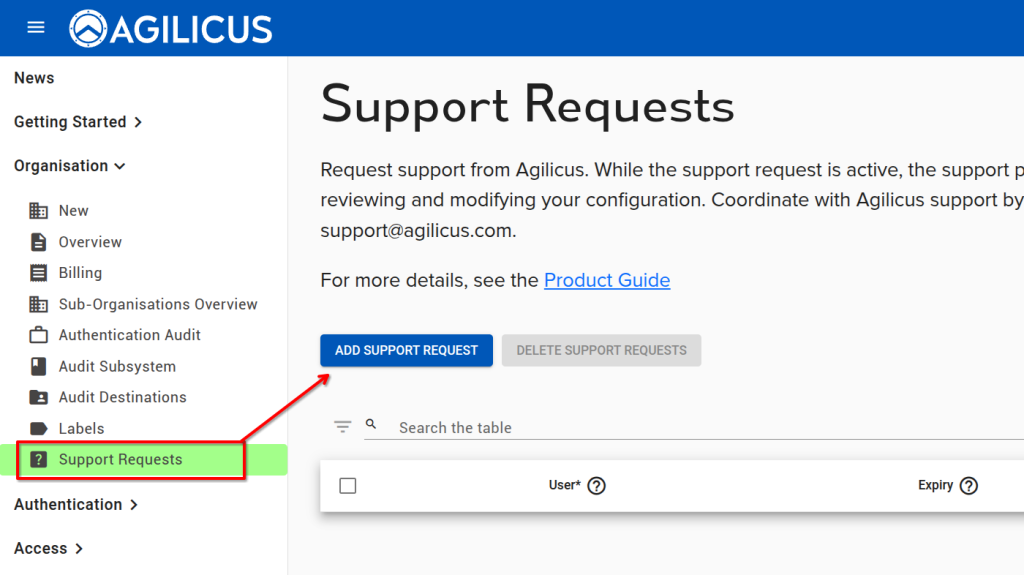
When you are working with a member of the Agilicus customer support team, and wish to give them access to your Organisation in order to collaborate, you may use the Support Requests feature. This will temporarily give a single person access. All activities will show up in the Audits, and you may revoke this permission at any time.
Key Concepts
You have a new team member, or a new vendor supporting you. You wish to add them so they have specific permissions.
- Navigate to your admin interface (https://admin.__MYDOMAIN__)
- Under Access/Users, type in their email. Optional: add one or more group assignments for permission
- Optional: Navigate to Access/Groups and add them to one or more group assignments for permissions
- Optional: Navigate to Access/Resource Permissions, and directly assign permissions if not done through a group above.
For more information on support options, please see Support.
When you are working with a member of the Agilicus customer support team, and wish to give them access to your Organisation in order to collaborate, you may use the Support Requests feature. This will temporarily give a single person access. All activities will show up in the Audits, and you may revoke this permission at any time.
When you initially signed up to the Agilicus AnyX platform, you choose a domain (either your own DNS name with a CNAME, or, an Agilicus-supplied domain). Your domain looks something like ORGNAME.agilicus.cloud. You will have received a welcome email with this information, as well as have been automatically signed-in in your browser to e.g. https://admin.__MYDOMAIN__.