When using SolarWinds web application through Agilicus AnyX you may find there is information missing in the output screen.
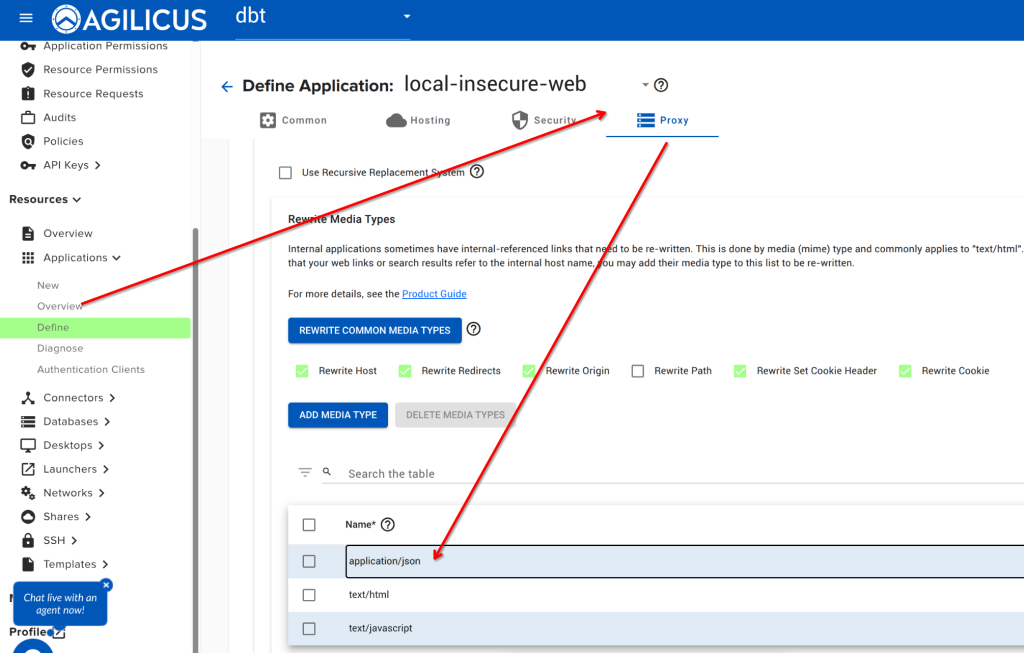
By default, SolarWindows uses a JavaScript file with the IP address embedded in it. You can enable ‘text/javascript’ “rewrite”Rewrite Media Types” in the Agilicus admin interface to resolve this issue.
Navigate to Resources/Applications/Overview. Select your web application. Click on the ‘proxy’ tab, from here select ‘Rewrite Media Types’, add ‘text/javascript’ as below.
Now do a hard reload of your browser on your SolarWinds URL, and it should properly populate.