
Who Authenticated When, Where
Authentication Audit
The Authentication audit provides a trail of all attempts by users (or service accounts) to prove their identity. This authentication process can have multiple steps, depending on authentication rules and upstream identity providers.
Authentication Audit
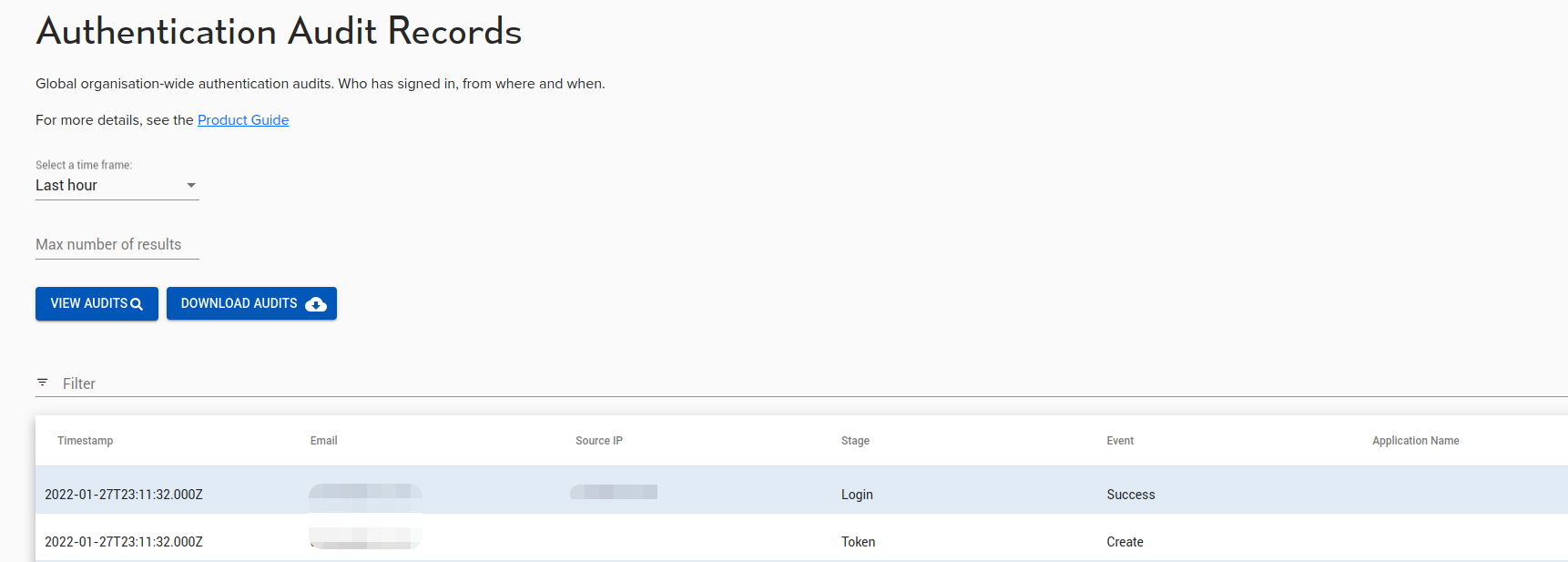
The Authentication audit provides a trail of all attempts by users (or service accounts) to prove their identity. This authentication process can have multiple steps, depending on authentication rules and upstream identity providers.
Not all stages will have all fields available. Each step has a timestamp (in UTC), an ‘Email’ (user), ‘Source IP’, Stage, Event, and Application Name (authentication client).
Authentication audits are also available via the API where additional columns may be extracted.
For the meaning of each stage and result, see How do I read the authentication audit?.
Authentication audit and Access audit
The Authentication audit records identity events: who signed in, how they proved the identity, and whether the sign-in succeeded. It is not a record of resource usage. A successful sign-in creates a session, and each application or resource the user opens receives its own access token, scoped to that resource. The Authentication audit records the sign-in and the token issuance steps. The Access audit records what the user did with those tokens.
Use the Authentication audit to answer who signed in. Use the Access audit to answer who reached which resource, from where, and whether it was allowed. The Access audit carries the resource name and resource type, the user, the token, the session and the source address, and, for sessions through a connector, the connector itself.
| Question | Audit | API |
|---|---|---|
| Who signed in, and how? | Authentication audit | /v1/auth_audits |
| Who reached which resource, and was it allowed? | Access audit | /v1/audits |
| Which sessions are active, and can I revoke one? | Sessions | /v1/sessions |
Why the source IP changes within one sign-in
Each record’s source_ip is the address of the host that made that particular request. Opening an application is a short pipeline, not a single request: the browser starts an OpenID Connect flow, Agilicus evaluates policy and issues an authorisation code, then a client exchanges that code for a token. When the exchange happens in the browser, the record carries the user’s address. When a connector or the Agilicus edge performs the exchange on the user’s behalf, the record carries that component’s address.
Both records belong to the same sign-in. Correlate them with request_id, which groups the steps of one attempt, and with session, which ties every token back to the original sign-in. A change of address does not indicate a second user or a second login.
This is the authorisation code grant from OAuth 2.0, often called three-legged OAuth. The three parties are the user, the client and the authorisation server. For a web application, the Connector runs the OpenID Connect proxy and acts as the client, so the final leg, the code exchange at the token endpoint, is a server-to-server request from the Connector. That is why the Token record carries the Connector’s address while the earlier records carry the user’s. For the protocol details, see section 3 of OpenID Connect Core.
Application name is the authentication client
The application_name and client_id fields identify the OpenID Connect client of the application being opened, not an arbitrary resource. Agilicus creates one client per web application automatically, and names it after the application, so a client identifier can look like a resource name. The built-in clients are profile, agilicus-builtin-portal and agilicus-builtin-wscat.
A desktop or Secure Shell (SSH) resource launched from Profile does not have its own OpenID Connect client, so it does not appear in this audit. Profile asks the Applications service for a client configuration. Applications mints a token scoped to that one resource, and the resulting session is recorded in the Access audit.
Why one user produces many authentication records
A web application is an OpenID Connect client, so opening it starts a sign-in flow. When the user already holds a valid session, Agilicus completes that flow without sending the user back to the upstream identity provider. The flow still writes Authentication Request, Policy Evaluation, CodeIssued and Token records, which is why one user can produce many records in a day without re-entering credentials. The upstream identity provider appears only when policy requires it, for example when the session has expired or when an application client is configured not to share sessions.
| Question | Audit | API |
|---|---|---|
| Who signed in, and how? | Authentication audit | /v1/auth_audits |
| Who reached which resource, and was it allowed? | Access audit | /v1/audits |
| Which sessions are active, and can I revoke one? | Sessions | /v1/sessions |
| user_id: string | The system-local id of the user performing the action. |
| upstream_user_id: string | The id of the user in the upstream system, if available. |
| org_id: string | The id of the organisation of the issuer against which the user is authenticating. |
| org_name: string | The name of the organisation of the issuer against which the user is authenticating. |
| time: date-time | the time at which the record was generated. |
| event: string | The event which generated the record. The meaning of the event depends on the stage where it occured. |
| source_ip: string | The IP address of the host initiating the action |
| token_id: string | The id of the token issued or reissued as part of the authentication. |
| trace_id: string | A correlation ID associated with requests related to this event |
| session: string | The session associated with tokens related to this event. This can be used to tie the actions undertaking by requests bearing tokens with the same session back to the authentication events which created the tokens. |
| issuer: string | The issuer the user logged in to. |
| client_id: string | The client id of the web application, client, etc. that the user is logging in with. Note that this is not the id of the IssuerClient, but rather the id presented to the authentication system to identify that client. This corresponds to name in the IssuerClient. |
| application_name: string | The name of the application within the system the user is logging in to. |
| login_org_id: string | The id of the organisation that the user is logging in to. Note that this is disctinct from the org_id field, which is tied to the issuer. This id is tied to the application. |
| login_org_name: string | The name of the organisation that the user is logging in to. This corresponds to login_org_id. |
| upstream_idp: string | The name of the identity provider proving the identity of the user. |
| stage: string | The stage of the login process. This identifies where in the pipeline the event was generated. |
| user_agent: string | The user agent of the client used to perform the login. |