
NERC CIP-003-9 – Legacy Remote Access Tools are Not Sufficient
On April 1, 2026, CIP-003-9: Cyber Security – Security Management Controls will become enforceable. Meet those requirements with a Zero Trust platform.
Executive Summary
On April 1, 2026, the North American Bulk Electrical System faces a critical regulatory shift with the enforcement of NERC CIP-003-9. The introduction of Section 6 – Vendor Electronic Remote Access Security Controls – introducing how Independent Power Producers manage, audit, and disable vendor remote access to low impact Bulk Electric Systems
The challenge: Legacy Solutions are not sufficient
Current vendor remote access strategies rely on a blend of legacy solutions such as VPNs, Remote Desktop, and jumpboxes. These legacy remote access tools are no longer sufficient to meet the new compliance mandates. These tools have inherent limitations:
- Authentication: They often rely on shared vendor credentials, making it impossible to identify the specific individual accessing the network
- Authorization: Once a user has passed perimeter level security check, they have broad network access, increasing the risk of lateral traversal, and accidental or malicious activities
- Audit Gaps: These tools lack the granularity required to provide a definitive, immutable record of “This specific user accessed these specific resources at this specific time and carried out these specific actions while in that resource.”
The Solution: Zero Trust with Agilicus AnyX
Agilicus AnyX provides a Zero Trust architecture that replaces outdated vendor remote access tools with granular, identity-based access.
“Zero trust architecture dynamically secures users, devices, and resources, moving beyond static perimeter defenses.”
CISA, Cybersecurity Best Practices – Zero Trust
AnyX enables:
- User authentication: Utilizing Single Sign-On and Multi-Factor Authentication to identify every unique user.
- Least Privilege Access: Granting users access only to the specific resources and permission levels required for their task.
- Instant Revocation: Empowering Operations teams with the agency to decommission users, manage user permissions, or terminate live sessions in seconds..
- Granular Audit Trails: Providing centralized session logs for three years, ensuring that the evidence for who, what, where, when, and how is complete and available.
As the deadline for NERC CIP-003-9 approaches, adopting a zero trust platform for vendor remote access is a strategic requirement., Agilcus AnyX ensures that low impact Independent Power Producers don’t just meet the minimum requirements of CIP-003-9 section 6.1 and 6.2, but establish a vendor remote access process that improves security posture and meets current industry standards.
Introduction
NERC CIP-003-9 – Security Management Controls goes into effect on April 1, 2026. The new standard introduces section 6: Vendor Electronic Remote Access Security Controls, which outline the requirements for determining vendor remote access (6.1) and the disabling of vendor accounts (6.2) to ensure that vendor remote access in Bulk Electrical Systems– including low impact systems – is conducted in a safe and secure manner.
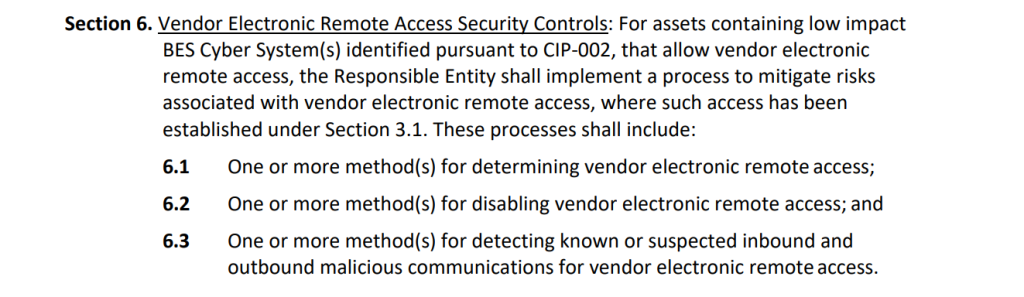
A blend of legacy remote access systems such as VPN, Remote Desktop, VNC, Jumpbox etc. are currently deployed in Independent Power Producers across North America, and have historically been the go-to when it comes to vendor remote access tools. However, the threat landscape has grown faster than the security levels these tools provide, and they are no longer considered the best practice when it comes to secure remote access. These legacy remote access tools are often clunky and have limitations when it comes to ensuring your organization is compliant with NERC CIP-003-9 6.1 and 6.2 as they lack least privilege access to limit resources, single sign-on to identify exactly which user is accessing the resources, or granular audit logs at a resource level. In a nutshell, these tools are unable to provide control access in a granular manner, revoke or change permissions in a granular manner, or able to provide granular audit log that shows “This specific user accessed these specific resources at this specific time and carried out these specific actions while in that resource”. Being able to control and audit the who, what, where, when, and how of remote access is critical for ensuring a safe and secure environment, and to break down events of a cybersecurity breach.
Zero Trust adopts the principle of least privilege (PoLP) access, ensuring that only authorized users are allowed access to the resources they have been granted access to with the permission levels they have. By utilizing single sign-on with a vendor’s existing identity provider, each individual user has their own unique set of permissions that is associated with their existing credentials, identifying which resources they can access, and at what privilege level, and when. This creates granular audit logs for every electronic remote session that are able to show “This specific user accessed these specific resources at this specific time and carried out these specific actions”. In addition to secure remote access, vendor access can be deactivated in seconds system wide.
The new NERC CIP-003-9 standard introduces section 6: Vendor Electronic Remote Access Security Controls with requirements for determining remote vendor access and the disabling of remote vendor access. With these new requirements, your organization will have to tighten vendor remote access controls, and in-turn your internal tools will need to be adjusted. Legacy technologies such as VPN, Remote Desktop, VNC, Jumpbox, etc. have not been considered best practice for remote access for some time and are de facto not sufficient for low impact Independent Power Producers to fulfil the requirements of CIP-003-9. Implementing a Zero Trust platform is not only considered best practice, it meets the needs of CIP-003-9 section 6.1 and 6.2.
Regulatory Constraints
When evaluating tools, whether existing or a new implementation to fulfil the requirements of NERC CIP-003-9 Attachment 1 sections 6.1 and 6.2 the following items need to be considered. NERC CIP has provided examples in the CIP-003-9 document under attachment 2 that act as guidelines.
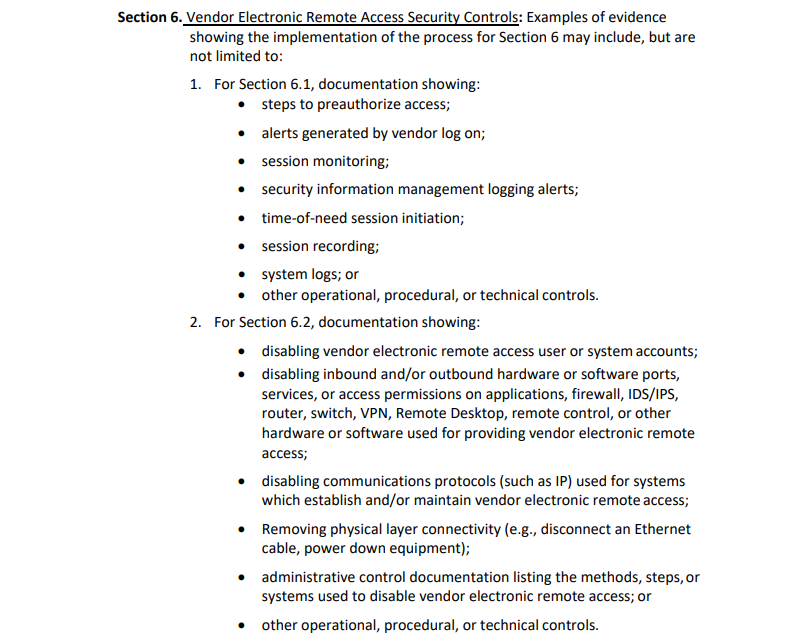
Pre-Authorized Access
To preauthorize access to a shared resource in your organization, there are two critical pieces of information needed: Who: Which specific user is going to be authorized and What: Which specific resource will be authorized to access and at what access levels and permissions.
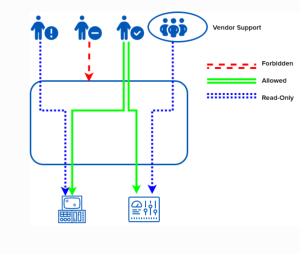
In order to have a process for pre-authorized access, an organization must start by identifying “Who” needs the access. The user that is accessing the systems must be an individual user and not a vendor group as a whole, therefore a shift from “Company A” requires access to “John at Company A” requires access is needed. In order to achieve this, the following actions are required:
- Eliminate the use of shared credentials for vendor remote access. This ensures we are identifying at a per user basis and not vendor-wide access
- Implement Multi-Factor Authentication to ensure a user is proving their identity with two pieces of information.
- Ensure the user is authorized to access systems, eliminating the risk of users no longer on the support team (employee turnover, project needs change, etc).
Multi-Factor Authentication is shown to reduce the threat of a cyber attack by up to 99%, and has recently been stated by NERC that deployment of Multi-Factor Authentication is one of the most impactful safeguards for interactive remote access.
Multi-Factor Authentication requires users to provide two of the following three pieces of information to access their accounts: Something they know (ex: Password), Something they have (ex: Mobile device), and something they are (ex:biometric fingerprint). Over 75% of initial access in cyber attacks is through valid credentials (Valid credentials, spearphishing, or brute force). With MFA enabled, in the event an attacker gains access to credentials, they are still missing a second piece of information to log-in and access resources.
Once we have identified that the user is authorized to access systems from the vendor organization, and that they have authenticated themselves as that individual user, we have successfully implemented the “who” of the pre-authorized access equation.
What: In order to have a process for pre-authorized access, an organization must identify which specific resources that individual user has access to, and ensure that only those resources are accessible at the access levels needed. Therefore, a shift from “a user can access our network to reach the resources they need” to “a user can only access resource A, at access level B, with permission level C” is needed. In order to achieve this, the following actions are required:
- Only allow access to the resources needed by the individual user to accomplish their task
- Precise authorization to implement granular access levels within resources
- Implement read/write privileges to ensure users are only able to access resources at privilege levels they need
By enforcing access on an individual user basis, and implementing least privilege access, an organization can implement pre-authorized access to say “This specific user, at this specific vendor, who has authenticated themselves, is allowed to access resource A, at access level B, at read only permission levels”
Granular Audit Trails
When evaluating vendor remote access tools, a critical element to consider is the ability, and level of granularity with session recordings for audit trails. Having granular audit trails being able to identify:
- Who – Which user accessed the resource during the remote access session
- What – What resources were accessed during the remote access session, what actions were taken, and what changes were made
- When – When did the remote access session take place and for how long
- How – How did the user connect, what device were they on, what IP address did they connect from
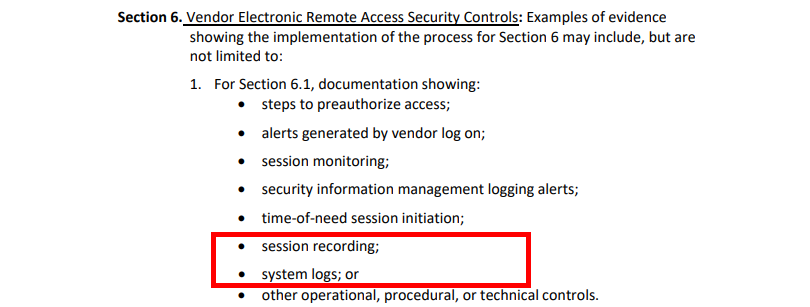
Not only are session logs crucial for incident response in the event of a cyber security breach, maintaining 3 years of granular audit trails for vendor remote access sessions play a critical role in achieving compliance with CIP-003-9 section 6.1 and 6.2
Disabling Vendor Remote Access
Section 6.2 is specifically focused on the disabling vendor electronic remote access. In order to be able to achieve this without disruption to support services, it is important to implement it at a granular level, allowing for disabling vendor access where needed.
Disable User Accounts: Being able to disable individual user accounts at a vendor organization enables users that need access to continue their day-to-day activities without interruption or changes in the workflow. In order to achieve this, user access at an individual level is needed vs shared credentials at a vendor organization level
Revoking / Modifying Authorization: Being able to disable which resources and access levels for an individual user enables your organization to take steps to restrict access without disabling an entire user or vendor. Example: An individual user from a vendor is no longer required to access resource A at access level B to interact with specific controls. That individual user can now be modified to access resource A at access level C, maintaining the requirements they need and require to do their tasks, without disrupting workflows. In order to achieve this, least privilege access at an individual user level is required.
Disabling Live Sessions: Being able to disable live vendor remote sessions at-will ensures that if there is any reason for a vendor to not have access to a resource, the session can be terminated at any time, instantly stopping the remote access session. This is a common feature among remote access tools.
Physical Layer Connectivity: Disabling physical layer connectivity should be the very last resort when it comes to disabling vendor remote access. This could include the shut down of power to routers, switches, machinery, etc or physically unplugging an ethernet connection to disable vendor remote access. Physical layer connectivity should be identified in an organization’s process for Section 6.2 as a “kill switch”. The goal for vendor remote access tools is to achieve the ability to disable access, without needing to fall back on physical layer connectivity.
Eliminate Multiple Remote Access Technology
Independent Power Producers across North America are currently using a blend of legacy remote access systems such as VPN, Remote Desktop, VNC, Jumpbox, etc. Having more than one solution implemented adds complexity when it comes to NERC CIP-003-9 6.1 and 6.2 compliance as technology between them differs, making it difficult to say that multiple vendor remote access tools are equally compliant. Operations teams look to eliminate multiple vendor remote access technologies, opting for a single platform that is simple for all to use, while meeting regulatory, and internal stakeholder requirements.
Simplify NERC-CIP Auditing
When looking at vendor remote access tools, NERC CIP Managers want to ensure that audit logs are all collected and stored in a centralized location with the same session log format regardless of what vendor is connecting to which resource. Not only does this simplify evidence retention, but it ensures there is no missing data, or unavailable data due to different audit log creation. Incomplete/inaccurate evidence retention can result in monetary penalties or non-monetary sanctions levied by NERC or the regional entity responsible.
Simplify Vendor Remote Access Process
New regulations come with tightened controls and adjusted processes, but users want simplicity, and will look for the path of least resistance to accomplish their task. Ensuring that the remote access tool a vendor is using to access your resources is simple, reduces the chance of “workarounds” being put in place. In order to achieve a simpler vendor remote access process, you need to start by implementing the right tools, and ensuring that compliance is achieved in a simple manner, and simple means that compliance from vendors is more likely to occur.
Agency for Vendor Remote Access Management
When identifying updated processes for vendor remote access management, ensuring that your operations team has agency to onboard, manage, and decommission users without the need of IT support tickets is critical to reducing the time needed to take action. If a vendor requires a new individual user to be provisioned, or if a user needs to be decommissioned, access levels changed, or revoked, the operations team requires the ability to do it as instantly as possible to ensure that day-to-day activities continue (granting access to a new user at a vendor), and immediately reducing risk by revoking access levels (individual user does not need access to resource A anymore). Ensuring that vendor remote access tools take operational agency into account are important for faster onboarding, near-instant user management, and proactive access management to reduce risk, and should be added to the NERC CIP-003-9 6.1 and 6.2 compliance process.
VPN, Remote Desktop, Jumpboxes Are Not Sufficient for Vendor Remote Access.
As industrial control systems shift to Industry 4.0, the requirement for secure remote access for vendors is increasing. NERC CIP-003-9 is specifically designed to ensure that organizations have a secure remote access system in place with the ability to revoke access as needed. Legacy remote access solutions such as VPNs, Remote Desktop, Jumboxes, VNC, were once the go to solutions for providing vendors with remote access capabilities, but are not sufficient in today’s threat landscape and are not the best solution for NERC CIP-003-9
Pre-Authorized Access Impossible at Individual User Level
As mentioned above, in order to have pre-authorized access, we need to identify the “who” and “what” of the equation.
Who: When using legacy technologies for vendor remote access, organizations often create a single shared account for support organizations with a single set of credentials. The credentials for this shared vendor account are then shared with the team to have remote access to the resources they need. With a shared password, it is impossible to identify which individual user from the vendor organization is the one connecting to your network, all you can identify is the vendor organization. Therefore, you are unable to clearly identify the “who” of the equation for pre-authorized access.
Technologies such as VPN, Remote Desktop, Jump Box, VNC the credentials and network configurations to log in are often configured within the client, allowing for a simple one-click launch of the remote access technology. VPNs can also be configured to be “Always on”, which bypasses even the “single click” access for a VPN; these methods completely eliminate the requirement and enforcement of Multi-Factor Authentication.
What: Legacy technologies operate at perimeter level security, once you have provided the credentials for access, you are connected to the network. With full access to a network, a user that needs access to resources A and B, are now also able to see and access all other resources on that network. Whether malicious or accidental, a user can modify settings on a resource that they should never have been able to access. Full access to a network also increases the penetration risk of a threat actor as it enables lateral traversal within the network to reach their intended target resource. In February 2022, APT28, a Russia based threat group, launched the “Nearest Neighbor Campaign”, which leveraged the zero-day exploitation CVE-2022-38028 and used wifi networks in close proximity to the intended target to gain access to the victim environment. By daisy-chaining multiple compromised networks, they were able to use compromised credentials to connect to a victim network.
Ensuring that individual users from vendors have pre-authorized access to the exact resources they need, at the access levels they need, and the read/write permissions to complete their task is a critical factor for minimizing the risk of unintentional or malicious access, and also eliminating the risk of lateral traversal. With VPNs, Remote Desktop, Jumpboxes using an all-or-nothing approach, and unable to identify “who” is accessing the systems, they have inherent security vulnerabilities when providing remote access for vendors, and do not offer best practices when looking at tools for NERC CIP-003-9 vendor remote access.
Lack of Granular Audit Trails
NERC CIP Managers need a simple, comprehensive solution when it comes to granular audit trails, recording the who, what, where, when and how of each remote access session from a vendor. VPN’s, Remote Desktops, Jumpboxes are not capable of providing granular level data at a resource level due to technology limitations.
Who: Without Single-Sign-On or single accounts created for every user, Identifying “Who” accessed a resource becomes impossible. For example, a vendor VPN may be either always connected, or connected with shared vendor credentials, and identifying which team member from the support vendor in audit logs is not possible. Therefore, identifying the “Who accessed this resource” at a user level is a key limiting factor for legacy remote access technology. For example, a vendor initiates a remote access session and connects to the organization network through a VPN through a single click of their desktop client. User #1 logs in to accomplish a task and completes it. The next task is to be completed by User #2. There is no way of identifying which user was connected to the network at any given time.
What: VPNs operate at Layer 3 of the OSI model, The network layer. When a remote user connects to an organization’s network, the audit log of what the user is accessing stops at the network level, being able to say “User accessed the network” as a general connection audit log. The shared resources vendors need remote access to operate at Layer 7, the application layer. The data for what resources were accessed, or what changes were made are not available for VPNs. Application level access may be recorded on the application session recording log, but if it does not utilize single sign-on or single user credentials, the “who” of the equation is lost.
When: With the nature of VPNs, Remote Desktop, Jumpboxes being able to be configured as “Always on” there is no definitive start or end time of the remote access connection. Gathering this data requires additional steps, analyzing network traffic. In cases where there is steady network activity (24/7 monitoring), it may be impossible to separate live vs. passive network activity.
Disabling Access Impossible at Individual User Level
NERC CIP-003-9 Section 6.2 focuses specifically on disabling vendor remote access when needed. With legacy remote access tools, perimeter level security, combined with shared vendor accounts allows for disabling access at a vendor level but not at an individual user level. When it comes to the day-to-day operations of your organization, disabling access to an entire vendor is not acceptable. For example, if an individual user at an organization should no longer have access to your resources, but they have access to the shared vendor credentials that were on a post-it note, you may need to disable VPN access for the entire vendor while passwords are reset. During this time, users that require access to carry out their day-to-day activities are unable to access the network. This could result in delays for updating systems, gaps in 24/7 monitoring, and support delays. The inherent limitations of remote access tools to disable accounts at an individual level make them an unacceptable choice, and cause disruptions in workflow when disabling an account is needed.
Eliminate Multiple Remote Access Technology
Implementing a blend of multiple remote access technologies for vendor remote access, not only requires different processes to be identified for each, but having more than one solution implemented adds complexity when it comes to NERC CIP-003-9 6.1 and 6.2 compliance as technology between them differs, making it difficult to say that multiple vendor remote access tools are equally compliant. Within VPN technology alone, there are many protocols, configurations, and clients. The same principle applies to VPNs where having more than one implementation adds complexity to when it comes to NERC CIP-003-9 6.1 and 6.2 compliance
Simplify NERC CIP Auditing
Legacy remote access technologies require accessing multiple resources to gather data for evidence. VPNs operate at the network layer, which will only provide information on accessing the organizations network and not at a resource level, requiring data logs to be retrieved from each individual resource that is remotely accessible. Although data can be compiled through multiple steps (and may be incomplete based on unknown user), the process to gather audit logs from multiple sources adds a level of complexity for the NERC CIP Manager that can be avoided.
Simple but Unsafe Vendor Remote Access Process
With a VPN, Remote Desktop, Jumbox being “always on”, vendors are able to access your network with a single click, or by simply launching a client that has been installed / pre-configured with network and user credentials. Although VPNs, Remote Desktop, and Jumpboxes are simple to use, the technologies do not align with best practices for vendor remote access, increasing the threat landscape for your organization.
No Operational Agency
With VPNs, Remote Desktop, Jumpboxes, there is heavy reliance on the internal IT team to facilitate requests for vendor remote access. Whether it’s configuration of a VPN, creating user accounts, change requests (password resets, reconfiguration of VPN clients, decommissioning an account, etc), the process includes creating a ticket for the IT team to complete. Not only does this take time, it also adds complexity and additional overhead for managing vendor remote access. The operations team has no agency over their own actions and requests must go through the IT workflow.
When looking at vendor remote access tools and processes for NERC CIP-003-9 6.1 and 6.2, it is important to ensure that your organization is considering industry best practices in its’ selection process. Over 75% of the entry points in cyber attacks happen with valid credentials, either through stolen passwords, phishing, or brute force attempts. NERC and CISA have stood behind Multi-Factor Authentication, saying that it is the most impactful safeguards for interactive remote access with the ability to reduce the threat of a cyber attack by up to 99%.
Without the ability to utilize single sign-on using a users credentials through their vendors existing identity provider, remote access is often achieved through an “always on” connection, or credentials that are created for a vendor shared account, requiring access levels dictated by who needs access at the top level, and having that level of authentication trickle down to the whole team that has access to the credentials at the vendor organization. The concept of “Who” accessed the resources is not-achievable, and managing credentials when there is turnover at the vendor organization is a delayed process, increasing the chances of a malicious attack on your network or resources.’
The session logs of “Who” did “What” and “When” are scattered, with no real ability to tie the data all together to provide an accurate record of the remote session. Not only does this add complexity for the NERC CIP Manager, it creates gaps in your audit logs that cannot be filled.
VPNs, Remote Desktop, Jumpboxes, etc, were once the standard for vendor remote access, but with the accelerated capabilities of threat actors, remote access tools have had to evolve to stay ahead of the curve. When considering vendor remote access tools and processes for NERC CIP-003-9 6.1 and 6.2, it is critical to deploy industry best practices, and legacy remote access tools no longer fit that criteria.
The Solution: Implement Zero Trust with Agilicus
Agilicus AnyX is a Zero Trust platform that moves away from traditional perimeter level access design where once you authenticate at the perimeter, you now have access to everything within the network, to an approach that is more akin to a high security building where a user is authenticated not only at the perimeter, but before accessing every resource to ensure they are authorized to do so. Government and regulatory bodies including CISA have identified Zero Trust as a cybersecurity best practice.
“Zero trust architecture dynamically secures users, devices, and resources, moving beyond static perimeter defenses.” – CISA, Cybersecurity Best Practices – Zero Trust
AnyX enables your organization to implement a Zero Trust platform for vendor remote access, implementing best practices including Multi-Factor Authentication, Single Sign-On, Least Privilege Access, while protecting your organization from cyber attacks at per resource level vs perimeter level, enabling your organization to adopt a vendor remote access tool that is industry standard and also being mandated / recommended by government bodies for critical infrastructure servicing the public sector.
Pre-Authorized Access at Individual User Level with Zero Trust
Unlike a VPN where it is impossible to identify the “who” and “when” of the pre-authorized access formula, Zero trust focuses on identifying these to implement the principle of least privilege for pre-authorized access at individual user levels.
Who: AnyX enables your organization to onboard and provision vendors or any third party organization that requires access to your resources remotely utilizing their existing user credentials, eliminating the need for shared vendor accounts. Operations teams gain agency, provisioning new users in seconds, regardless of their identity provider. Single Sign-On now enables your organization to provide access at a user level where a shared password would be at a vendor level. Users now are able to use Multi-Factor Authentication, and permission settings can be controlled at an individual user level.
AnyX enables your organization to enforce Multi-Factor Authentication, requiring users to provide two of the following three pieces of information to access their accounts: Something they know (ex: Password), Something they have (ex: Mobile device), and something they are (ex:biometric fingerprint) across all shared resources, even on resources that don’t natively support it. With AnyX, every user is provisioned independently, which in-turn allows for Multi-Factor Authentication to be enforced on a per user basis to access resources. With Multi-Factor Authentication, in the event that a user’s credentials are compromised, they still require an additional piece of information such as biometrics or a mobile device to access a resource. Multi-Factor Authentication is a best practice for NERC CIP-003-9 6.1
With Single sign-on and Multi-Factor Authentication, your organization is able to precisely identify “This specific user, at this specific vendor, who has authenticated themselves, is allowed to access resource A, at access level B, at read only permission levels”
What: AnyX enables your organization to utilize the principle of least privilege – precisely designing and limiting what each user can do, down to a specific resource, actions they can take within the resource, and at what read / write permission levels. For example, User A can access systems 1, 2, and 3, but only at read write access, where User B can access systems 2,3 with full access but only has read access on system 4. Least privilege access ensures that vendors accessing your systems are only able to access the resources they need to complete their task and nothing else on your network. In the unfortunate event where a threat actor breaches your network, the potential damage they can inflict is bound to the access level of the user credentials that were used, reducing the blast radius, and keeping your network protected from lateral traversal.
User permissions can be easily adjusted through the AnyX Admin Portal, allowing users to access resources when they need, and disable access to specific components of that resource or read / write permissions. Being able to disable vendor remote access permissions with least privilege access enables you to adjust access controls as needed, when needed, allowing for disabling vendor access at a granular, per resource, per action level for NERC CIP-003-9 6.2.
With the “who” and “what’ of the formula solved, your organization can now implement pre-authorized access at an individual level with zero trust.
Complete and Accurate Granular Audit Trails
AnyX enables your organization to keep records of remote access sessions with granular audit trails. Where VPNs operate at Level 3 on the OSI model as stated above, Zero Trust operates at layer 7 – the application layer. Granular audit trails from AnyX are able to show exactly who accessed what resources on the network, what they did in the resource, and for how long. With AnyX, audit trails are stored for up to 3 years, and are easily accessible in the event of an audit.
Decommissioning Users / Access Management at an Individual Level
User permissions can be easily adjusted through the AnyX Admin Portal, allowing users to access resources when they need, and disable access to specific components of that resource or read / write permissions. Being able to disable vendor remote access permissions with least privilege access enables you to adjust access controls as needed, when needed, allowing for disabling vendor access at a granular, per resource, per action level for NERC CIP-003-9 6.2.
Decommissioning user access when they are no longer at the vendor organization is instant with Single Sign-On as it utilizes their existing identity provider to log in and access resources. If a user is no longer at a vendor organization, their access to your organization systems are disabled as soon as their credentials are disabled in their directory. Being able to automatically decommission users and deny access when they leave an organization is a critical component to disable vendor remote access for NERC CIP-003-9 6.2
Eliminate Multiple Remote Access Technology and Be Equally Compliant
AnyX enables your organization to implement a single platform for all vendor remote access, ensuring that all shared resources being accessed remotely are done so in the same manner, with the ability to enforce best practices such as Multi-Factor Authentication, Single sign-on, least privilege access, and simple vendor/user management with the same process across all support organizations. AnyX simplifies the process documentation requirements for NERC CIP-003-9 6.1 and 6.2 by requiring a process outline for only one remote access tool, ensuring all vendors are equally compliant.
Simplify and Centralize NERC CIP-003-9 6.1 6.2 Auditing
AnyX enables your organization to keep records of remote access sessions with granular audit trails. Where VPNs operate at Level 3 on the OSI model as stated above, Zero Trust operates at layer 7 – the application layer. Granular audit trails from AnyX are able to show exactly who accessed what resources on the network, what they did in the resource, and for how long. With AnyX, audit trails are stored for up to 3 years, and are easily accessible in the event of an audit. Complete, immutable, and granular logs of all vendor remote access sessions nearly eliminates the risk of Incomplete/inaccurate evidence retention which can result in monetary penalties or non-monetary sanctions levied by NERC or the regional entity responsible.
Simplify Vendor Remote Access Process
Agilicus AnyX enables your organization to implement a simple remote access platform that meets industry best practices while improving your security posture. The web-based launched means vendors don’t need to install clients, and no network configurations are required. The platform launches seamlessly from any device with a web browser. A user logs in with their existing credentials from their identity provider, and is only shown the resources that they have access to. In the event where additional passwords are required to access shared resources, password injection enables an organization to set passwords within the Admin Portal, automatically entering them when an authenticated user accesses an authorized resource. The end user never sees the passwords, and simplifies the vendor remote access process, while eliminating the need for shared passwords.
Gain Operational Agency
AnyX gives your operations team agency to provision users, and set the resource access, and permission levels vendors need to carry out their tasks – all in line with your organizations security policies. Being able to provision and manage users within the operations teams simplifies the workflow for vendor remote access as requests no longer need to flow through IT support tickets, increasing time-to-action and introducing additional steps. User permissions can be easily adjusted through the AnyX Admin Portal, allowing users to access resources when they need, and disable access to specific components of that resource or read / write permissions. Being able to disable vendor remote access permissions with least privilege access enables you to adjust access controls as needed, when needed, allowing for disabling vendor access at a granular, per resource, per action level for NERC CIP-003-9 6.2.
When looking at vendor remote access tools and processes for NERC CIP-003-9 6.1 and 6.2, it is important to ensure that your organization is considering industry best practices in their selection process. Agilicus AnyX is a Zero Trust platform that enables your remote access to function like a high-security building with authentication and authorization required to access each resource, with best practices in mind including multi-factor authentication, single sign-on, precise authorization, and granular audit reports. Agilicus AnyX empowers your operations team to provision, change, decommission user accounts for vendor remote access and simplifies the NERC CIP Manager process for NERC CIP-003-9 6.1 and 6.2.
Conclusion
Legacy technologies such as VPN, Remote Desktop, VNC, Jumpbox, etc. are no longer considered best practice for remote access and are not sufficient for low impact Independent Power Producers to fulfil the requirements of CIP-003-9. Implementing a Zero Trust platform is not only considered best practice, it meets the needs of CIP-003-9 section 6.1 and 6.2.
As the April 1, 2026, deadline for NERC CIP-003-9 approaches, the transition from legacy tools to Zero Trust is no longer a matter of preference, it is a necessity. Legacy technologies like VPNs, Remote Desktop, Jumpboxes were once the industry standard, but their inherent inability to provide individual authentication and authorization, complete granular audit trails, and disabling access at a granular level leaves low impact Independent Power Producers exposed to both cyber threats and significant compliance penalties.
By implementing Agilicus AnyX, organizations move beyond the vulnerable perimeter defense to an industry standard Zero Trust architecture. This shift provides the ‘Who, What, and When’ required for audit-ready documentation while empowering operations teams with the agency to onboard, manage, and decommission users in seconds.
Protecting Bulk Electrical Systems requires a security posture that evolves as fast as the threat landscape. Agilicus AnyX ensures that your organization doesn’t just meet the minimum requirements of CIP-003-9, but sets a new standard for secure, resilient, and simplified vendor remote access.
Get In Touch
Ready To Learn More?
Agilicus AnyX Zero Trust enables any user, on any device, secure connectivity to any resource they need—without a client or VPN. Whether that resource is a web application, a programmable logic controller, or a building management system, Agilicus can secure it with multi-factor authentication while keeping the user experience simple with single sign-on.

info@agilicus.com, +1 519 953-4332
300-87 King St W, Kitchener, ON, Canada. N2G 1A7

info@partner.com, +1 555 555-5555
1 Main Street, Townsville, ON, Canada. POST-CODE