

Native Studio 5000 Access. Zero VPN Friction.
Provide controls engineers with direct, responsive access to Allen-Bradley PLCs for remote logic editing, routine diagnostics, and commissioning without jump boxes, VPN client profiles, or firewall changes.
Native workstation performance, complete operational isolation.
Remote Support and Maintenance for Allen Bradley PLCs via Rockwell Studio 5000
Instant Online Programming. Native Engineering Performance.
Empower automation engineers to troubleshoot and program ControlLogix, CompactLogix, and Micro800 controllers remotely using native Studio 5000 and RSLinx software, slashing Mean Time to Repair (MTTR) and eliminating travel costs.
No Corporate VPN
Rockwell Studio 5000 Native
Outbound-only HTTPS
PROBLEM / SOLUTION
Supporting Allen-Bradley PLCs across multiple facilities traditionally requires cumbersome VPNs, laggy jump boxes, or costly physical site dispatches. Agilicus AnyX provides a direct, identity-authenticated connection:
The Operational Challenge
❌ Jump Box Latency & Licensing: Remote desktops introduce display lag, require expensive multi-user Rockwell licenses, and force engineers into shared account logins.
❌ VPN Subnet Collisions: Traditional VPNs fail when managing overlapping IP address spaces (such as 192.168.1.x) across different customer plant locations.
❌ Costly Site Dispatches: Simple logic modifications and routine diagnostics often require physical site visits when remote access fails.
The Customer Outcome
✅ Native Workstation Performance: Run Studio 5000 and RSLinx locally on your engineering laptop with full responsiveness and existing software licenses.
✅ Simultaneous Multi-Facility Support: Connect to multiple customer sites and controllers at the same time without IP conflicts or routing reconfigurations.
✅ Granular, Audited Zero Trust: Grant access to specific controllers on demand with complete user-level audit logging, keeping surrounding plant networks isolated.
Why Engineers Choose Agilicus for Rockwell Automation
Simplified engineering workflows that satisfy plant operations, systems integrators, and IT security teams.

Full Native Studio 5000 Speed
Work directly within RSLinx and Studio 5000 at local bus speed, utilizing your own EDS files, add-on instructions, and licensed tools without remote desktop lag.
Overlap-Proof Multi-Site Routing
Seamlessly manage multiple client plants with identical internal PLC IP addresses concurrently without complex NAT mapping or routing tables.

Identity-Verified Controller Access
Enforce role-based access mapped directly to corporate Single Sign-On and multi-factor authentication, replacing broad subnet VPN access with controller-level precision.
HOW IT WORKS
1
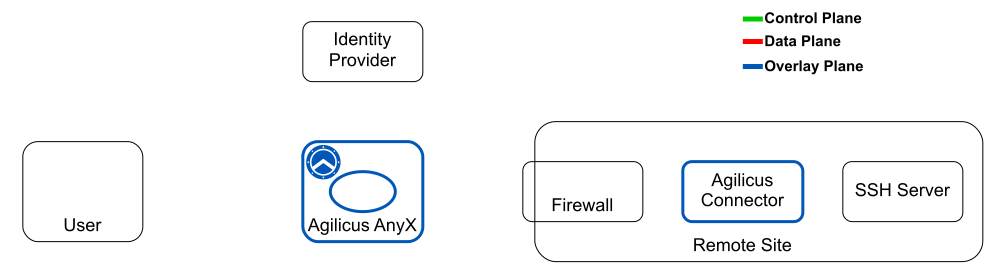
Deploy Connector
Run the lightweight Agilicus connector on any host or industrial PC within the plant network.
2
Define PLC Resources
Map Allen-Bradley controllers in Agilicus AnyX and assign granular permissions to authorized engineers.
3
Launch RSLinx
Open RSLinx Classic or Studio 5000 via Agilicus Desktop Integration using your corporate credentials.
4
Program & Support
Go online, monitor tag values, and download logic updates remotely with the same experience as being on-site.
Stop Managing VPNs. Start Supporting Systems.
“Agilicus AnyX enables our engineering team to support multiple customer plant sites simultaneously using our native Studio 5000 tools, drastically cutting response times while strengthening our security posture.”