
Incident Response Playbook: Agilicus AnyX Environment TEMPLATE
Version: 1.0
Last Updated: 2026-03-07
Organisation: [Customer Name]
1. Introduction and Scope
1.1 Purpose
This incident response playbook provides [Customer Name] with standardized, repeatable procedures for preparing for, identifying, responding to and recovering from cybersecurity incidents within a zero-trust architecture protected by Agilicus AnyX. The goal is to minimize the impact of adverse events, ensure rapid containment and restore services securely while adhering to industry best practices.
1.2 Scope
This playbook applies to all IT and operational technology networks, applications, systems and data protected by the Agilicus AnyX platform. It applies to all internal employees, third-party contractors and vendors who authenticate through Agilicus to access corporate resources.
1.3 The Zero-Trust Context
Traditional incident response heavily relies on network-centric actions, such as unplugging cables or blocking IP addresses at a firewall. In an Agilicus AnyX zero-trust environment, the perimeter is the identity. Incident response fundamentally shifts to identity-centric actions:
- Surgical Containment: Responders can instantly revoke active sessions, suspend specific identities or require step-up multi-factor authentication without disrupting the entire network.
- Granular Isolation: Agilicus acts as an identity-aware proxy. If a threat is detected, specific applications or operational technology segments can be instantly isolated from the IT network by modifying access policies, acting as a highly secure kill-switch.
- Identity-Attributed Forensics: Every HTTP request and resource access is logged and tied to a verified identity, eliminating the guesswork of mapping IP addresses to users during forensic analysis.
1.4 Authority and Definitions
Responsibility for the security of company information resides with the [Executive title, e.g., chief information security officer/president]. During an active high or critical cybersecurity incident, the authority to execute this playbook is delegated to the incident handler.
- Zero-trust network access: An IT security framework requiring strict identity verification for every person and device trying to access resources.
- Identity provider: A service (e.g., Microsoft Entra ID, Google Workspace) that manages digital identities. Agilicus AnyX integrates with the identity provider to verify users.
- Identity-aware proxy: The component of Agilicus AnyX that brokers access to internal applications, ensuring only authenticated and authorized traffic passes through.
- Web application firewall: A security filter within Agilicus AnyX that inspects inbound traffic for malicious patterns (e.g., SQL injection or cross-site scripting).
2. Cybersecurity Incident Response Team
The cybersecurity incident response team is responsible for executing this playbook.
2.1 Team Structure and Responsibilities
| Role | Responsibilities |
| Executive | Accountable for overall cybersecurity. Handles board-level reporting, approves high-impact containment decisions (e.g., taking critical operational technology systems offline) and allocates emergency resources. |
| Incident Handler | The operational lead. Triages the incident, organizes the team, initiates the playbook and coordinates all technical response and recovery activities. |
| Agilicus Administrator | The technical subject matter expert for the AnyX platform. Responsible for executing session revocations, locking down access policies, analyzing Agilicus authentication, access and audit logs, and implementing emergency web application firewall rules. |
| Network and IT Lead | Provides technical expertise regarding internal network infrastructure, endpoint management and downstream system recovery. |
| Communications | Manages internal employee messaging and external public relations. Ensures notifications comply with regulatory requirements. |
| Legal Counsel | Advises on legal obligations, regulatory reporting (e.g., PIPEDA, NERC CIP) and liability during the breach. |
2.2 Contact Matrix
(To be populated by the organization)
| Role | Name | Title | Phone | |
| Incident Handler | ||||
| Agilicus Admin | ||||
| Agilicus Support | Support Team | Agilicus Helpdesk | +15199534332 | support@agilicus.com |
3. Incident Severity and Categorization Matrix
The incident handler will determine the severity of the incident to dictate the pace and scale of the response.
3.1 Severity Levels
| Severity | Indicators / Scope | Required Action |
| 1 – Critical | Indicators: Widespread data loss, active ransomware, compromise of the primary identity provider or an attacker breaching an operational technology and industrial control system network segment. Scope: Organization-wide; critical servers affected. | Convene full cybersecurity incident response team immediately. Execute global session revocation in Agilicus. Isolate operational technology boundaries via AnyX access policies. |
| 2 – High | Indicators: Confirmed credential theft, unauthorized access to sensitive internal applications or lateral movement detected. Scope: Multiple users or highly sensitive data affected. | Convene the cybersecurity incident response team. Revoke sessions for affected users and groups. Analyze Agilicus access logs to trace downstream access. |
| 3 – Medium | Indicators: Targeted phishing success (no lateral movement yet) or localized endpoint malware. Scope: Individual host or person. | Incident handler and network and IT lead manage. Suspend affected identity provider account. Wipe endpoint. |
| 4 – Low | Indicators: Agilicus web application firewall blocking automated vulnerability scans (e.g., SQL injection attempts) or anomalous but blocked login attempts. Scope: External probing; protective controls functioning. | Monitor via the security information and event management system. No immediate cybersecurity incident response team activation required. |
3.2 Categorization of Threats
- Identity and Authentication Anomalies: E.g., multi-factor authentication fatigue attacks or impossible travel logins.
- Device and Endpoint Compromise: E.g., Stolen laptop or malware-infected workstation.
- Application and Web Application Firewall Anomalies: E.g., Attempted exploitation of a vulnerable web application exposed via the proxy.
- Operational Technology Segmentation Threats: E.g., Unauthorized attempts to cross from the IT environment into the industrial control systems and operational technology environment.
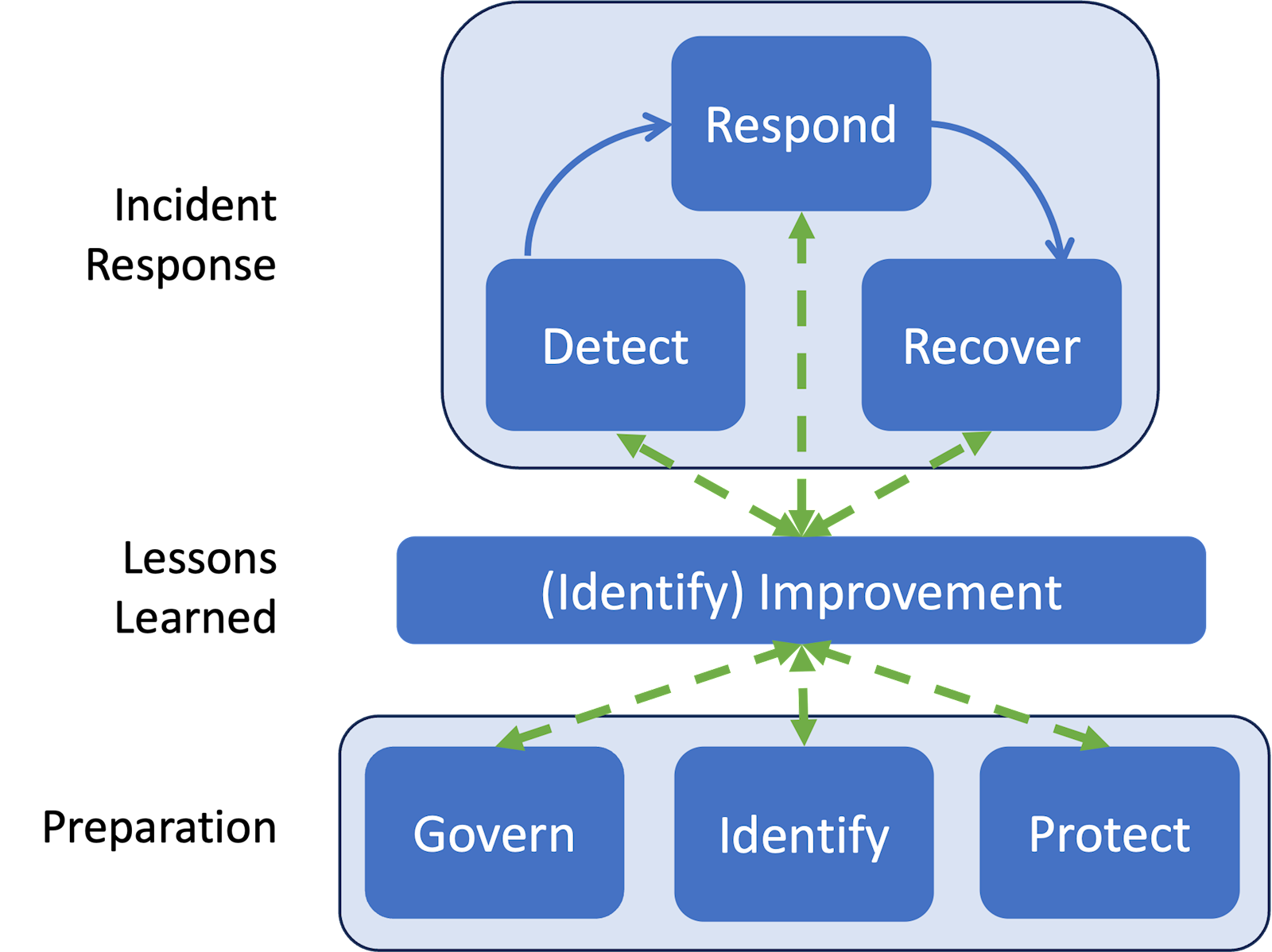
4. The Incident Handling Process (NIST SP 800-61 Rev. 3 / CSF 2.0 methodology)
(Reference Model: NIST Incident Response Life Cycle)
This playbook utilizes the updated NIST incident response life cycle, which integrates incident response continuously into broader cybersecurity risk management using the NIST Cybersecurity Framework 2.0.
Phase 1: Preparation (Govern, Identify, Protect)
- Govern: * Ensure this playbook is approved by executive leadership and tested annually.
- Pre-configure “Emergency Access” roles within Agilicus AnyX (e.g., a lockdown policy that denies all access except for designated incident responders).
- Establish incident coordination procedures and communication channels.
- Identify: * Integrate Agilicus AnyX logs (authentication, access and audit) with the organization’s centralized security information and event management system (e.g., Microsoft Defender, Google SecOps) to establish a single pane of glass.
- Map critical dependencies, outlining exactly which Agilicus access policies govern the boundary between IT and operational technology and industrial control systems networks.
- Define baseline access patterns for standard users.
- Protect: * Deploy Agilicus identity-aware proxies to shield internal applications from the public internet.
- Enforce strict step-up multi-factor authentication via the upstream identity provider and apply least-privilege access rules natively within the Agilicus admin console.
Phase 2: Incident Response (Detect, Respond, Recover)
A. Detect
- Continuous Monitoring: Security teams must monitor the security information and event management system (or query the Agilicus CLI) for web application firewall anomalies, such as repeated cross-site scripting or SQL injection attempts targeting internal apps.
- Identity Anomalies: Analyze identity provider and Agilicus authentication logs for indicators of compromise such as impossible geographic travel, excessive failed logins or unexpected multi-factor authentication bypass attempts.
- Declaration: The incident handler declares an incident when adverse events meet the predefined criteria in the severity matrix.
B. Respond – Mitigate and Analyze
- Mitigation and Containment (The Zero-Trust Advantage):
- Session Revocation: The Agilicus administrator must immediately revoke active sessions for suspected compromised accounts within the Agilicus interface.
- Account Suspension: Disable the user account at the upstream identity provider to prevent re-authentication.
- Application and Network Isolation: If the threat is severe (e.g., ransomware), modify Agilicus access policies to instantly sever access to critical segments. This acts as a secure kill-switch to protect operational technology environments without needing to physically unplug routers.
- Root Cause Analysis and Forensics:
- Utilize the granular, identity-attributed Agilicus access logs. Because every request passes through the identity-aware proxy, responders can see exactly which internal IP address or service the attacker accessed, what time and what actions were attempted, completely bypassing the need to correlate IP addresses in DHCP logs.
- Review Agilicus audit logs to ensure the attacker did not escalate privileges or modify access control lists within the platform.
C. Recover
- Safe Restoration: Once the threat is eradicated (e.g., malware removed, compromised credentials reset and multi-factor authentication hardware tokens rotated), begin restoring services.
- Policy Reversion: Move from the temporary “Emergency Lock-Down” containment policies back to standard zero-trust access policies.
- Validation: Carefully monitor Agilicus access logs for the restored users and systems for 48 hours to ensure no persistent threat actors remain in the environment.
Phase 3: Lessons Learned (Identify: Improvement)
- Post-Incident Review: Within two weeks of the incident, the cybersecurity incident response team must hold a hotwash meeting to discuss what occurred, the root cause and how well the playbook functioned.
- Continuous Improvement: Update web application firewall rules to block newly identified attack vectors, adjust Agilicus access controls to be more restrictive if necessary and tune security alerts to ensure similar anomalies can be detected earlier in the future.
5. Specific Incident Scenarios (Playbooks)
(This section addresses specific customer concerns regarding the Agilicus AnyX architecture, utilizing NIST CSF 2.0 response phases.)
Scenario A: Third-Party Identity Provider Breach
- Threat: The organization’s upstream identity provider (e.g., Microsoft Entra ID, Google Workspace, Okta) is compromised, allowing an attacker to forge authentication tokens or bypass primary multi-factor authentication.
- Detect: High volume of impossible travel alerts, bulk password resets via the identity provider, unexpected multi-factor authentication configuration changes or direct breach notification from the identity provider vendor.
- Respond:
- Mitigation and Containment: Immediately suspend the identity provider trust relationship within the Agilicus AnyX admin interface. Fall back to localized, pre-configured emergency “break-glass” accounts. Execute a global session revocation command to instantly terminate all active AnyX user sessions.
- Analysis: Interrogate Agilicus access logs within the security information and event management system to trace the attacker’s blast radius. Identify exactly which downstream web applications or SSH and RDP targets were accessed using the compromised identity provider tokens.
- Recover: Restore identity provider trust only after the third-party provider has secured their environment and SAML and OIDC certificates have been rotated. Force re-authentication for all users.
- Improvement: Evaluate enabling step-up multi-factor authentication natively within Agilicus AnyX for highly sensitive operational technology applications as a defence-in-depth layer independent of the primary identity provider.
Scenario B: Individual User Device Compromise
- Threat: A user’s laptop or mobile device is stolen or infected with malware (e.g., an info-stealer that captures session cookies).
- Detect: Endpoint detection and response alerts on the endpoint, physical theft reports or anomalous access blocks registered by the Agilicus web application firewall originating from the user’s known device.
- Respond:
- Mitigation and Containment: Identify the user in the Agilicus admin console and instantly revoke their specific active sessions. Quarantine the device at the endpoint level.
- Analysis: Filter the Agilicus access logs by the user’s specific identity. Review the timeline post-infection to determine if the attacker attempted to pivot laterally or access restricted operational technology and industrial control systems via the user’s permitted AnyX pathways.
- Recover: Wipe and re-image the compromised device. Reset user credentials at the identity provider. Re-issue a fresh session token upon successful and secure re-authentication.
- Improvement: Implement or tighten continuous device-posture checking requirements before granting access through the identity-aware proxy.
Scenario C: Insider Threat (Malicious Legitimate User)
- Threat: A disgruntled employee with valid credentials and authorized access begins acting maliciously (e.g., data hoarding or sabotaging configurations).
- Detect: Accessing sensitive applications outside of normal business hours, downloading bulk data or direct notification from human resources and legal.
- Respond:
- Mitigation and Containment: Immediate, targeted revocation of the user’s Agilicus AnyX access.
- Analysis: Unlike traditional VPNs, Agilicus logs are tied directly to the user’s identity, not just an IP address. Utilize the non-repudiable access logs to create a precise forensic trail of every file and system the user touched. Check the audit logs to verify if the user possessed administrative privileges and altered any global access permissions.
- Recover: Offboard the user officially across all systems. If the audit logs indicate unauthorized configuration changes, revert those specific AnyX policies.
- Improvement: Audit and enforce the principle of least privilege across all AnyX groups. Configure security alerts for anomalous bulk data access patterns.
Scenario D: Unidentified Malware or Ransomware Outbreak
- Threat: Ransomware or persistent malware is detected in the internal environment, but the entry vector and command-and-control channels are unknown.
- Detect: Internal network alarms, encrypted file shares or automated security alerts.
- Respond:
- Mitigation and Containment: Utilize Agilicus AnyX as an emergency kill-switch. Modify access policies to instantly sever network segments (e.g., completely isolating the operational technology network from the IT network) to halt lateral movement, without requiring physical network intervention.
- Analysis (Inbound): Review the Agilicus web application firewall and access logs to rule out or identify the entry point. Did an attacker exploit an exposed internal web application through the proxy?
- Analysis (Outbound): Since AnyX can act as a gateway and proxy, review the logs for signs of outbound command-and-control beaconing or data exfiltration attempts.
- Recover: Clean and rebuild the internal network. Verify that no unauthorized backdoor configurations were added to the AnyX platform. Safely restore standard inter-segment access policies once the environment is declared clean.
- Improvement: Update web application firewall rules to block the specific exploit payloads used by the attackers. Ensure stricter network micro-segmentation policies are applied.
Scenario E: Third-Party Incident Response Access (Secure Enablement)
- Threat: A severe internal incident has occurred, requiring external forensic investigators and consultants to access the locked-down environment safely.
- Detect: (Proactive scenario triggered by an existing incident).
- Respond:
- Mitigation and Enablement: Do not issue full VPN access to the third party. Instead, use Agilicus AnyX to rapidly provision just-in-time, heavily restricted access. Provide web-only or restricted SSH and RDP access directly via the browser. Ensure the third party has zero standing privileges.
- Analysis: Continuously monitor the external incident response team’s actions using the access logs. Every command and system accessed will be strictly attributed to their specific, temporary identity.
- Recover: Immediately revoke the incident response team’s access profiles in Agilicus AnyX as soon as the engagement ends.
- Improvement: Pre-build “Emergency Incident Response Consultant” roles and profiles within Agilicus during peacetime to drastically speed up secure onboarding during a crisis.
6. Appendices
Appendix A: Agilicus Log Types and Retrieval Methods
Agilicus AnyX generates rich, identity-attributed logs across multiple categories. If configured, the preferred and most efficient location for log analysis during an incident is the organization’s centralized security information and event management system (e.g., Microsoft Defender, Google Security Operations). If a security information and event management system is not available, these logs can be natively retrieved via the Agilicus AnyX admin interface or programmatically via the CLI (pip install agilicus).
- Authentication Logs: Details all successful and unsuccessful authentication attempts. Key telemetry includes the user identity (who), geographic location (where), timestamp (when), browser user-agent, IP address and multi-factor authentication status.
- Audit Logs: The customer can retrieve logs of type ‘audit’ from the Agilicus AnyX admin interface (or the CLI). These show all configuration changes (e.g., who assigned permissions to whom).
- Access Logs: The customer can retrieve logs of type ‘access’, which shows individual attempts (successful or blocked) for each resource, indicating who, from where and to what.
Appendix B: Agilicus Emergency Lock-Down Checklist
(To be tailored by the organization)
- [ ] Suspend identity provider trust.
- [ ] Revoke active sessions globally.
- [ ] Implement strict operational technology and IT segmentation policies.
- [ ] Apply “Block All” web application firewall overrides if necessary.
Appendix C: Regulatory Reporting Timelines
(To be tailored by the organization)
- PIPEDA: Must report breaches of security safeguards involving personal information that pose a real risk of significant harm (RROSH) “as soon as feasible.”
- NERC CIP / ICS: Standardized reporting windows depending on the asset classification (e.g., one-hour reporting for critical cybersecurity incidents).