Your logs, Your SIEM, Your Webhook
Audit Destinations
Configure your own private log destinations.
Audit Destinations
Four types of auditing information are available:
- Authentication: users presenting credentials to obtain an access token
- Authorisation: individual transactions with an access token that are checked for allow/deny
- Access logs: individual transaction detail information
- API access: changes to the state of the system via API
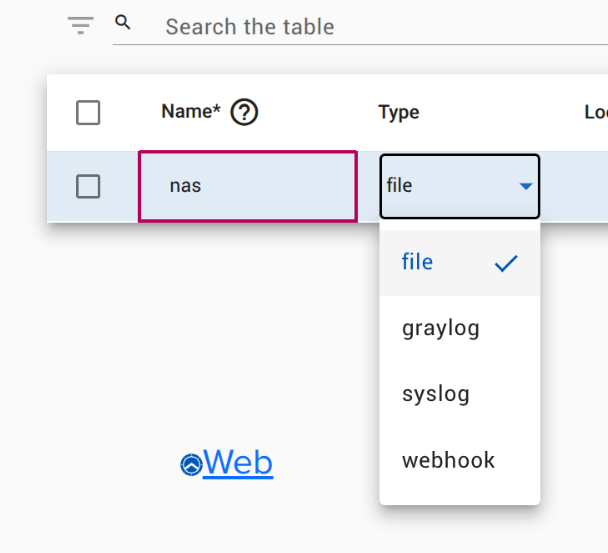
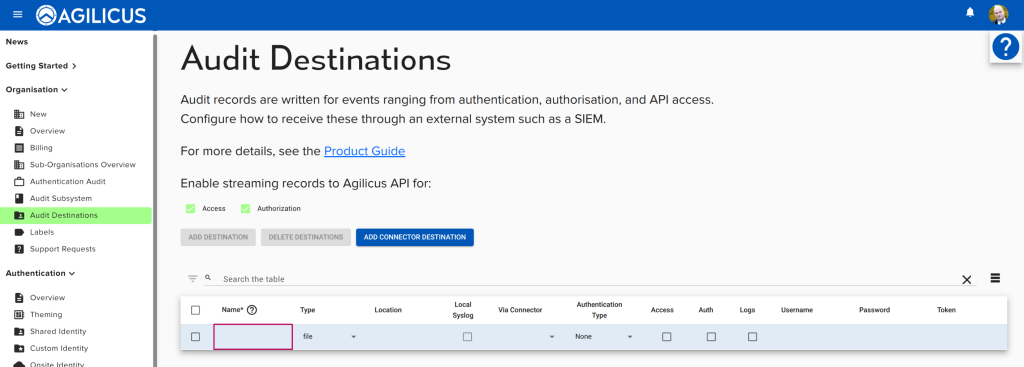
By default, all records except for those generated by an Agilicus Connector are stored inside the Agilicus cloud. In addition, you may send logs to a webhook (or, in the case of the Connector, a file), syslog, graylog.
You may enable records from the Connector to come back to the Agilicus Cloud by enabling ‘Access’ and ‘Authorisation’ check marks in the Audit Destinations screen.
Web Hook Destination
For each web hook destination, optional authentication information may be passed.
The intent of the audit destinations to a webhook is to allow the use of an external SIEM or log collector. Messages are sent in JSON format, an example is shown below:
{
  "events": [
    {
      "create_time": "2022-02-13T21:17:10.912073099Z",
      "event": {
        "authority": "share.dbt.agilicus.cloud",
        "bytes_received": 0,
        "bytes_sent": 0,
        "downstream_remote_address": "99.250.30.222",
        "duration": 16,
        "flags": "",
        "hostname": "ds120",
        "http_referrer": "https://profile.dbt.agilicus.cloud/",
        "http_user_agent": "Mozilla/5.0 (X11; Linux x86_64) AppleWebKit/537.36 (KHTML, like Gecko) Chrome/98.0.4758.74 Safari/537.36",
        "jti": "",
        "log_type": "access",
        "method": "OPTIONS",
        "org": "",
        "path": "/tmp/",
        "protocol": "HTTP/1.1",
        "request_id": "ad74cbc1-572c-47f3-8346-6e8f0ccc6c6a",
        "response_code": 200,
        "source_id": "XcX49eHn99DaoADbqfut4c",
        "source_org_id": "5kX8JJdQ3CzYXXXXXX",
        "source_type": "agent-connector",
        "start_time": "2022-02-13T21:17:09.757266487Z",
        "sub": "",
        "upstream_authority": "127.0.0.1:45819"
      },
      "unique_id": "cCwsSeh8gwH66rVLMzayEi"
    },
    {
      "create_time": "2022-02-13T21:17:10.912278621Z",
      "event": {
        "allowed": true,
        "authenticated": true,
        "authority": "share.dbt.agilicus.cloud",
        "downstream_remote_address": "99.250.30.222",
        "error": false,
        "hostname": "ds120",
        "jti": "hTrNWKetLyWLuS5rGA5B2s",
        "log_type": "authorization",
        "method": "PROPFIND",
        "org": "5kX8JJdQ3CzYXXXXXX",
        "path": "/tmp/",
        "protocol": "HTTP/1.1",
        "request_id": "c7e93aa2-bef1-4b96-9e0d-b94775f39f1d",
        "source_id": "XcX49eHn99DaoADbqfut4c",
        "source_org_id": "5kX8JJdQ3CzYXXXXXX",
        "source_type": "agent-connector",
        "sub": "XGMKWs5Sqh3wXXXXXX",
        "time": "2022-02-13T21:17:10.151794113Z",
        "whitelisted": false
      },
      "unique_id": "qrb8Cidj56AZr6MtLChwun"
    }
  ]
}
To test your integration, copy the above text to a file (e.g. logs.json) and use:
curl -X POST -d@logs.json https://my-webhook:portSyslog Destination
You may choose to send your logs to a syslog receiver. This can either be directly accessible from each connector, or, accessible from one connector that the others use as a gateway (this allows multi-site routing).
Create a destination. Set the type to ‘syslog’. Enter a URI for the destination in the format
transport://path?param
The transport would be one of unix, udp, tcp. So to send to a syslog server on the same machine it might be unix:///dev/log. To send to a syslog server via UDP on a remote, it might be udp://10.11.12.13:514.
Optional parameters might be:
severity(Default:6/ LogInfo); Range:0(Emergency) to7(Debug)facility(Default:16/ LogLocal0); Range:0(Kernel) to23(Local7)max_message_size(Default:10240) – The maximum size (in bytes) of a log message before it is truncated.