# Latency And Load Testing Your Web Site With Locust and Istio
Your new wite site uses new technology. Shake it down, load it up, see its performance using [Locust](https://locust.io/) and sitemap. Compare to your [Istio](https://istio.io/) metrics from Grafana. All with 0 configuration. Latency and load testing with locust and istio Too easy? Read on.
First, understand that a modern web site has a wel-known file called [robots.txt](https://developers.google.com/search/docs/advanced/robots/intro). Its main purpose is in instructing a search engine how and what to see on your site. One of its main tools is the link to the [sitemap](https://developers.google.com/search/docs/advanced/sitemaps/overview)(s). A sitemap is a full list of the pages on your site. So, if your site is setup automatically, our proposed latency and load testing with locust and istio can read robots.txt, from there find the sitemaps, read the sitemaps, and thus have a list of pages. An example robots.txt is below:
```
curl https://www.agilicus.com/robots.txt
User-agent: *
Disallow: /wp-admin/
Disallow: /wp-content/plugins/
Disallow: /readme.html
Disallow: /refer/
Sitemap: https://www.agilicus.com/sitemap_index.xml
Sitemap: https://www.agilicus.com/post-sitemap.xml
Sitemap: https://www.agilicus.com/page-sitemap.xml
Sitemap: https://www.agilicus.com/tribe_events_cat-sitemap.xml
Sitemap: https://www.agilicus.com/post_series-sitemap.xml
Sitemap: https://www.agilicus.com/category-sitemap.xml
```
A sample sitemap might look like below:
```
https://www.agilicus.com/blog/
2021-03-01T01:27:28+00:00
https://www.agilicus.com/email-strict-transport-security/
2019-12-14T18:53:31+00:00
https://www.agilicus.com/www/2019/11/b6c8291c-image.png
```
From here its super simple to do latency and load testing with locust and istio. I write a sitemap-parser-locust-task, see the code on [Github](https://github.com/Agilicus/web-site-load). But the steps are super simple for you to run:
```
export SITE=https://mysite.ca
git clone https://github.com/Agilicus/web-site-load
cd web-site-load
poetry install
poetry run web-site-load
```
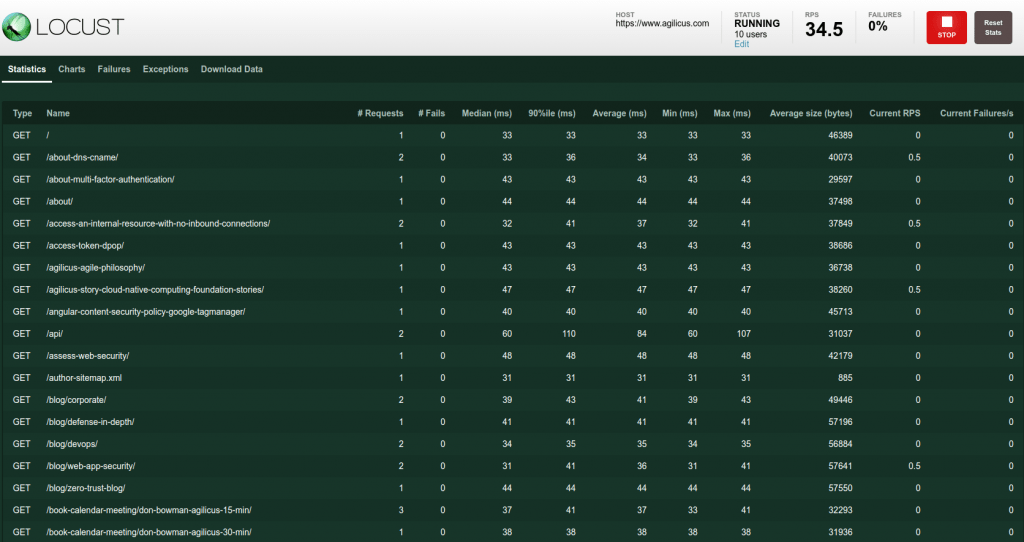
At this stage you can open your browser to http://localhost:8089 and start your test, see the statistics. After a few seconds we'll start to see each URL on our site as a separate line. We'll see the 90% percentile latency, and error counts.
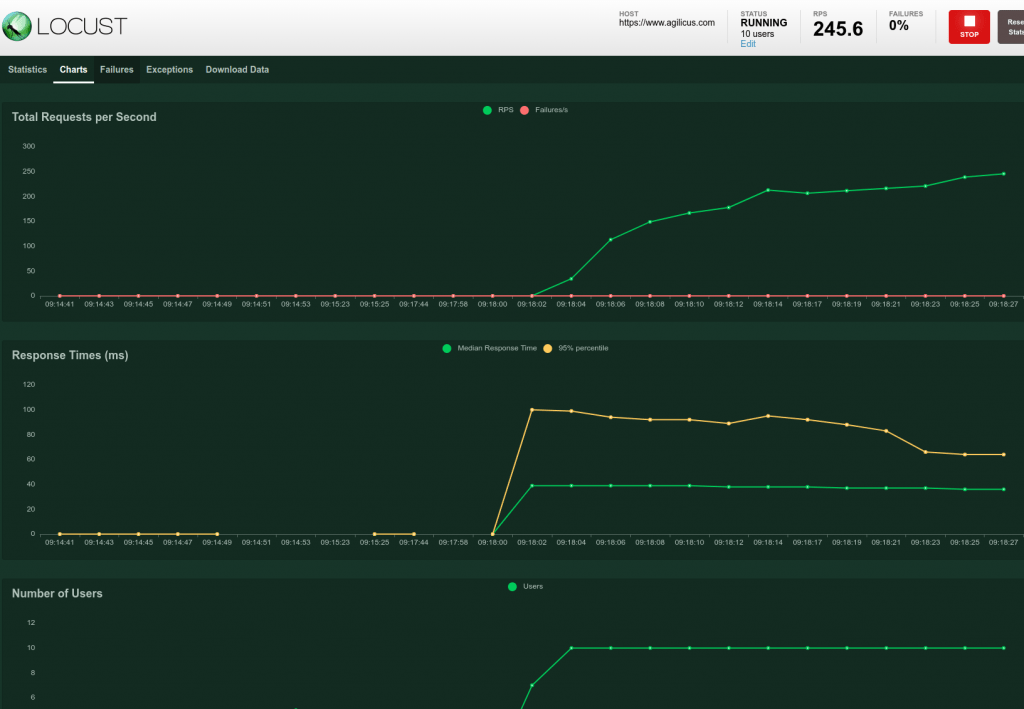
[](https://www.agilicus.com/www/09cce575-latency-screen.png)We can also view this as a set of charts:
[](https://www.agilicus.com/www/5a4629f1-response-chart.png)Now, we can cross-compare our latency and load testing with locust and istio to our istio mesh statistics from [Grafana](https://github.com/grafana/grafana).
[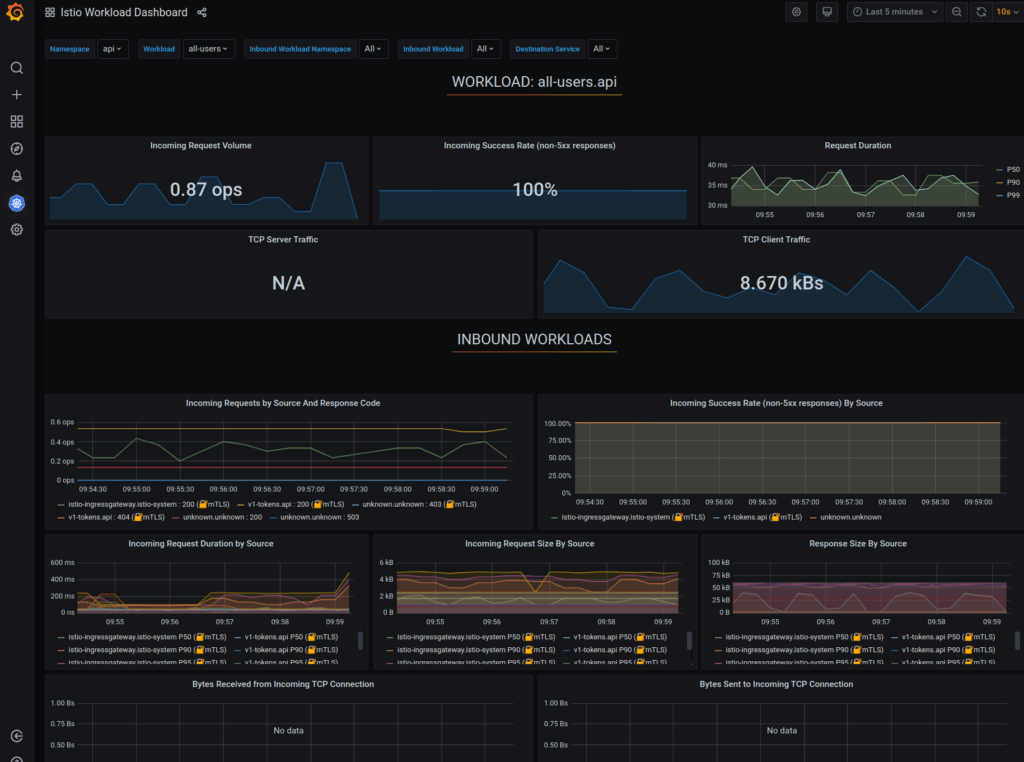](https://www.agilicus.com/www/3e271f6a-istio-mesh-stats.png)Istio Mesh StatsSo, what have we achieved? We are loading all pages on our site (via sitemap via robots.txt), in random order, from a set of threads. We can arbitrarily load down our web site and observe if there are errors (perhaps indicating a plugin or script problem). We can see that our databases, filesystems, load balancers are working.
And, we did it with (almost) no code. See the details on [github](https://github.com/Agilicus/web-site-load).
```
import random
from locust import TaskSet, task
from pyquery import PyQuery
class SitemapSwarmer(TaskSet):
def on_start(self):
request = self.client.get("/robots.txt")
self.sitemap_links = ['/']
for line in request.content.decode('utf-8').split("\n"):
fn = line.split()[:1]
if len(fn) and fn[0] == "Sitemap:":
lf = line.split()[1:][0]
request = self.client.get(lf)
pq = PyQuery(request.content, parser='html')
for loc in pq.find('loc'):
self.sitemap_links.append(PyQuery(loc).text())
self.sitemap_links = list(set(self.sitemap_links))
@task(10) def load_page(self):
url = random.choice(self.sitemap_links)
self.client.get(url)
```
```
from os import getenv
from locust import HttpUser
from .sitemapSwarmer import SitemapSwarmer
class WebSiteLoad(HttpUser):
tasks = {
SitemapSwarmer: 10,
}
host = getenv('SITE', 'https://www.example.com')
min_wait = 5 * 1000
max_wait = 20 * 1000
```